AI Photo & Video Editor-Nebula
- 2.2
- Rating
- 50.00K
- Installs
- Free
- Price

 Analysis by App-foxy
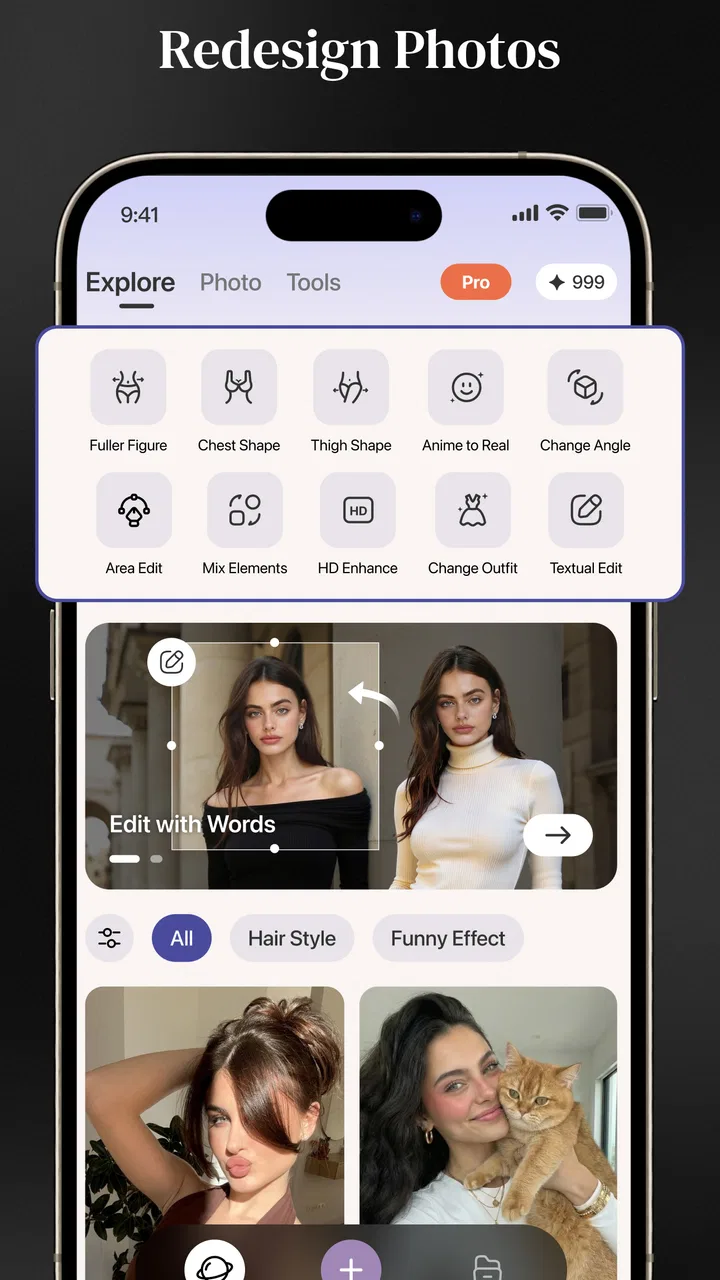
AI Photo & Video Editor-Nebula caught my attention because it tries to cover several popular creative jobs in one place: adding words to photos, changing body shape, and making dance-style videos. That combination makes a strong first impression. Instead of opening separate tools for a quick caption, a portrait adjustment, and a short animated clip, I can explore all three ideas from the same photography app.
My first reaction was mixed, though. The app is clearly built around fast visual experimentation rather than careful, professional editing. That is not automatically a weakness. For casual posts, playful portraits, and short-form content, speed can matter more than detailed control. But it also means I would not treat it as a replacement for a full photo editor or a dependable video-production tool.
The real question is whether Nebula remains useful after the novelty wears off. Its first-week appeal is easy to understand: the creative options invite quick tests, and the free entry point removes much of the risk. Its longer-term value depends on whether those tools fit naturally into the way you already make and share images.
You May Also Like

 AccuWeather: Weather Radar
AccuWeather Review: A Quick, Clear Forecast for Everyday Decisions
For everyday plans, the best forecast is the one you can understand quickly. AccuWeather makes rain timing, radar, and local conditions easy to act on, with a few trade-offs.

 Hill Climb Racing
Why Hill Climb Racing Still Turns Crashes Into One More Run
A tiny car, a bumpy hill and one more upgrade: Hill Climb Racing keeps resurfacing because its simple chaos makes every near-miss feel personal.

 AliExpress - Shopping App
AliExpress Makes Global Shopping Feel Personal, but Shoppers Bear the Risk
AliExpress turns a global marketplace into a pocket-sized discovery engine. Its reach is useful, its shopping loop compelling, and its trade-offs easy to miss.

 Lords Mobile: Kingdom Wars
Lords Mobile Is a Kingdom-Building Routine, Not a Quick Match
A case-by-case verdict on the building, battles, device demands, and social commitments that make Lords Mobile rewarding for some players and exhausting for others.

 PDF Scanner app - TapScanner
TapScanner Makes Paperwork Easier to Capture, Check, and Share
TapScanner makes scanning with a phone feel less like a rescue operation and more like a dependable step in getting work done. Its capture tools are useful, though not flawless.

 Block Blast!
 Shows How Much a Puzzle Game Can Leave Out
A quiet grid game shows why puzzle players increasingly value instant clarity, repeatable skill and low-pressure play—and where the genre still needs to catch up.
More From Our News Desk
View All News


What using Nebula feels like in the first week
During an initial session, I would begin with the simplest task: importing a photo and adding words. Text on an image sounds basic, but it is often the feature people need most frequently. A quick announcement, a birthday image, a personal quote, or a social post can be finished without moving between a camera roll, a design app, and a separate video editor.
The body-reshaping function creates a different kind of appeal. It is more immediately eye-catching because the result can look noticeably different from the original image. I see this as a feature for light experimentation rather than a tool to use automatically on every portrait. Small adjustments may help with composition, but aggressive changes can make proportions look unnatural and can reduce the sense that the photograph still represents the person in it.
The dance-video idea is likely to be the feature that brings the most curiosity. Turning a still image into something more energetic gives an otherwise ordinary portrait a reason to be shared. It suits playful messages, short social clips, and experiments with old photos. At the same time, novelty is doing much of the work here. A feature can be fun several times before the results start to feel familiar.
I would recommend approaching the first session as a test of personal fit instead of trying to master every option immediately. Use one ordinary portrait, one image that needs text, and one photo suitable for a playful video. This gives a clearer impression of the app than applying every effect to the same picture. It also helps reveal which part of Nebula you would realistically return to.
One useful workflow is to keep the original image untouched and create a separate edited copy before experimenting with reshaping. That habit matters because a dramatic adjustment can be difficult to judge while you are still focused on the controls. Comparing the edited version with the original after a short break is a better way to spot stretched backgrounds, uneven edges, or changes that are stronger than intended.
Text editing deserves the same practical care. Words placed over a busy photograph can become hard to read, especially when the image already contains bright highlights or strong patterns. I would choose the photo first, crop it for the final destination, and only then add the wording. Doing this in the opposite order can leave a caption awkwardly positioned after the image is resized.
The app is free to start, which makes this kind of testing straightforward. However, in-app purchases range from $7.99 to $99.99 per item, so I would avoid assuming that every creative option has the same access conditions. Before investing time in a particular workflow, I would check which tools are available without payment and whether the result I want requires an in-app purchase.
Where the early excitement is strongest
Nebula makes the most sense when the goal is a quick transformation rather than a polished production. A casual user may enjoy turning a familiar portrait into a short dance clip, adding a bold message to a travel image, or trying a subtle shape correction before sharing a picture. The app’s appeal comes from reducing the distance between an idea and a finished visual.
It could also be useful for someone who does not want to learn a large editing interface. Traditional photo editors often provide more control, but that control can slow down a simple task. If I only need a caption or a playful variation, a focused workflow is more comfortable than navigating layers, masks, timelines, and export settings.
That convenience has a limit. A person who cares about exact typography, detailed retouching, consistent branding, or frame-by-frame video control will probably outgrow this approach. Nebula is better suited to spontaneous content than to work that must look identical across a series of posts.
How it compares with familiar alternatives
Compared with a standard photo editor, Nebula appears more specialized around quick visual effects and transformation. A conventional editor is usually the better choice for exposure correction, color balance, cropping precision, and layered design. If the main problem is that a photo is too dark or poorly framed, I would reach for the conventional tool first.
Compared with a dedicated design app, Nebula is more appealing when the image itself is the starting point. Design-focused alternatives generally make it easier to build posters, invitations, branded templates, or multi-element layouts. Nebula’s text function is more useful for adding a message to a photograph than for creating a complete visual identity.
Against a dedicated video editor, the dance-video feature offers speed but not the same level of control. A video specialist is preferable when I need precise cuts, music timing, transitions, captions, or a repeatable format. Nebula is the more convenient choice when the desired result is a quick animated experiment from a still image.
That comparison helps define its audience. I would suggest it to casual creators, social users, and people who enjoy testing image effects without learning several separate apps. I would skip it as a primary tool if my work depends on predictable output, detailed retouching, or serious video editing.
Whether the app earns a place after the first month
The first month is where the difference between a fun experiment and a lasting utility becomes clear. The text feature has the best chance of becoming a habit because it applies to many everyday images. The body adjustment tool is more occasional: it may be useful for a particular portrait, but it is unlikely to be necessary every time I edit a photo.
The dance-video function sits between those two extremes. It can remain enjoyable if I regularly share short, playful content or like sending unusual greetings to friends. For someone who mainly stores photos privately, its value may fade quickly. A feature that depends on sharing has less staying power when the user’s normal routine is simply taking and organizing pictures.
A practical monthly routine would be to use Nebula for one specific purpose rather than opening it whenever I want to edit anything. For example, I might reserve it for captioned social images or occasional animated portraits, while keeping a regular editor for corrections and a video app for structured clips. This division prevents the app from becoming frustrating simply because it is being asked to do jobs outside its strongest area.
Another useful approach is to build a small personal style. Choose a consistent position for text, avoid extreme reshaping, and use the dance effect selectively. The result is less likely to feel like a random filter and more likely to feel intentional. This is especially important if I share several images over time and want them to look connected without turning the process into a full design project.
There is also a social consideration around body reshaping. I would use that function carefully, particularly when editing someone else’s image. A technically successful alteration can still be uncomfortable or misleading if the person did not ask for it. The best long-term use is usually subtle correction or playful, clearly fictional experimentation—not silently changing someone’s appearance and presenting it as an ordinary photograph.
A realistic everyday scenario
Imagine I take a portrait at a friend’s birthday and want to send it that evening. The original image is fine, but the background is busy and the message needs to be visible. I could crop the picture, add a short caption, and save a version for messaging. Later, I might use the same image for a playful dance clip, but I would treat that as a separate share rather than replacing the original.
In that situation, Nebula earns its place because it shortens a small but common task. I do not need a complete graphic design project, and I do not need a full video timeline. The app is valuable because it gives me an easy creative step between taking a photo and sending it.
Now imagine a different situation: I am preparing a polished campaign with several images that need matching fonts, precise spacing, color consistency, and carefully edited video. Nebula would not be my first choice. The convenience that helps with a birthday image becomes a limitation when repeatability and control matter more than speed.
Maintenance, storage habits, and recurring friction
Creative apps are easiest to keep when they have a clear role. If Nebula is used for every kind of image task, I would quickly have to remember which tool is best for which result, and that can make the app feel less simple than it first appeared. Keeping a small set of repeatable workflows—captioned photo, subtle portrait adjustment, playful animated image—would reduce that mental overhead.
I would also save important originals outside the editing process. Any app built around transformations encourages experimentation, and experiments are easier when the source image is safely preserved. This is particularly important for body reshaping, where a later comparison with the unedited file is part of judging whether the result still looks believable.
Export checks are worth making before sharing. I would inspect the saved image or video, not just the preview inside the editor, and confirm that the text remains readable and the subject is not distorted at the edges. A preview can feel convincing while a final crop exposes a problem. This extra glance takes little time and prevents avoidable embarrassment.
The age classification is Teen, so I would still use sensible judgment about the images being edited and shared. The presence of appearance-changing tools makes context important, especially for younger users who may interpret heavily altered portraits as a normal standard. The app can be playful, but it is healthier when edits are treated as creative choices rather than requirements.
Nebula comes from AILI TECH, and its current version is 1.1.2. For a small, effect-driven app, keeping it updated is part of the maintenance decision because creative tools can change how familiar workflows behave. I would revisit the app after updates rather than assuming that a favorite process will always look or work exactly the same.
What may cause fatigue over time
The biggest source of fatigue is repetition. A dance transformation can be surprising the first few times, but the appeal may weaken if the output follows a similar pattern each time. The same is true of strong body reshaping: once the novelty passes, I may prefer a normal crop, better lighting, or a more restrained correction.
Another source of tiredness is uncertainty about value. Since the app is free to download but includes paid items between $7.99 and $99.99, I would be cautious about building a workflow around a feature before understanding its purchase requirements. A tool feels less convenient when I reach the final step and discover that the result depends on an unexpected payment.
The average rating is 2.2 from around 64 ratings, with roughly 13 written reviews. That is a modest reception, and I would treat it as a reason to test the app personally rather than as proof that it will fail for everyone. Still, it suggests that expectations should remain measured. I would not install it expecting the refinement of a mature, widely established editing suite.
Its reach is also worth putting in perspective: it has passed 50 thousand installs, which shows that people are trying it, but it does not place it in the same familiarity bracket as the largest photography platforms. That can be acceptable if the specific mix of text, reshaping, and dance videos matches my needs. It matters less whether the app is famous than whether I would open it again after the first experiment.
For me, recurring value would come mainly from the text-editing workflow and the occasional animated portrait. The reshaping feature is useful in moderation but not a reason to make every image look different. If those two regular uses fit my habits, the app can justify staying installed. If I only want to see the dance effect once, it will probably become background clutter.
My long-term verdict on Nebula
AI Photo & Video Editor-Nebula is most convincing as a quick creative side tool, not as an all-purpose replacement. Its strongest quality is the way it gathers several playful image ideas into one accessible photography app. I can imagine recommending it to a friend who wants to add words to pictures, try a light portrait adjustment, or turn a still image into something more lively without learning a complicated editor.
I would not recommend it as the main workspace for professional photography, detailed design, or serious video production. Those users need consistency and control that a novelty-focused editor may not provide. I would also hesitate to recommend it to someone who rarely shares images, because the most entertaining features lose some purpose when the finished result stays only in a private gallery.
The free starting point makes the decision fairly easy: test the three main workflows with ordinary images, inspect the saved results, and decide which one you would genuinely use next month. Keep original files, use reshaping conservatively, and check the purchase requirements before relying on a paid effect. Those habits make the experience more predictable and help separate useful tools from one-time distractions.
After the initial excitement, I see a narrow but real place for Nebula. It can stay installed if I want a fast captioning option and occasional playful video transformations. It does not earn permanent space merely because its effects are eye-catching. Its lasting value depends on whether quick, imperfect, shareable creativity is part of my normal routine. For that audience, it is worth trying; for everyone else, a more focused photo or video alternative will likely be the better long-term companion.
FAQs for AI Photo & Video Editor-Nebula
01What is AI Photo & Video Editor-Nebula used for?
AI Photo & Video Editor-Nebula is designed for enhancing and transforming photos and videos with artificial intelligence. It may include tools for retouching portraits, applying artistic effects, improving image quality, creating stylized visuals, editing short videos, and adding filters or adjustments. The exact tools can vary by version, so users should review the current feature list before downloading.
02Is AI Photo & Video Editor-Nebula free to download and use?
The app may be available as a free download, but some advanced effects, AI processing options, export settings, or editing tools can require in-app purchases or a subscription. Before starting a trial, check the pricing page carefully, including renewal terms and cancellation instructions. Free features may also include advertising, watermarks, or limits on the number of edits.
03Does AI Photo & Video Editor-Nebula require an internet connection?
Many AI-powered editing functions require an internet connection because photos or videos may be processed on remote servers. Basic tools, such as cropping, brightness adjustments, or simple filters, may work offline depending on the version installed. A stable connection is recommended for uploading media, generating effects, downloading results, and preventing interrupted processing or failed exports.
04Is my personal content safe when using AI Photo & Video Editor-Nebula?
Before uploading personal photos or videos, users should read the app’s privacy policy and understand how media is collected, processed, stored, and deleted. AI editors can require cloud processing, which may involve sending files to external servers. Avoid uploading highly sensitive content unless the company clearly explains its security practices, retention period, and whether uploaded material is used for training.
05What should I check before downloading AI Photo & Video Editor-Nebula?
Check that the application is published by the official developer and is compatible with your Android or iOS device. Review recent user ratings, permissions, subscription costs, watermark policies, supported export formats, and available storage requirements. It is also wise to confirm whether the app contains advertisements, offers automatic subscription renewal, or provides the specific AI photo and video tools you want.
Pros
- AI tools create polished edits with minimal manual adjustments.
- Includes creative effects for both photos and short videos.
- Useful templates help speed up social media content creation.
- Simple interface makes basic editing accessible to beginners.
- Regular creative updates can keep the editing experience fresh.
Cons
- Some advanced AI features may require a subscription or extra credits.
- Results can vary depending on image quality and lighting.
- Video exports may take longer on older or less powerful devices.
- Certain effects may look repetitive after frequent use.
- Privacy policies should be checked before uploading personal images.

AI Photo & Video Editor-Nebula
Gallery